How to Compare Two Strings in Python (in 8 Easy Ways)
A guide on how to check if two strings are equal, or similar. Learn how to find the difference between two strings. Make complex comparisons and more!
Comparing strings is a fundamental task common to any programming language.
When it comes to Python, there are several ways of doing it. The best one will always depend on the use case, but we can narrow them down to a few that best fit this goal.
In this article, we'll do exactly that.
By the end of this tutorial, you'll have learned:
- how to compare strings using the
==and!=operators - how to use the
isoperator to compare two strings - how to compare strings using the
<,>,<=, and>=operators - how to compare two string ignoring the case
- how to ignore whitespaces when performing string comparison
- how to determine if two strings are similar by doing fuzzy matching
- how to compare two strings and return the difference
- how to debug when the string comparison is not working
Let's go!
Comparing strings using the == and != operators
The simplest way to check if two strings are equal in Python is to use the == operator. And if you are looking for the opposite, then != is what you need. That's it!
== and != are boolean operators, meaning they return True or False. For example, == returns True if the two strings match, and False otherwise.
>>> name = 'Carl'

>>> another_name = 'Carl'

>>> name == another_name
True

>>> name != another_name
False

>>> yet_another_name = 'Josh'

>>> name == yet_another_name
False
These operators are also case sensitive, which means uppercase letters are treated differently. The example below shows just that, city starts with an uppercase L whereas capital starts with a lowercase l. As a result, Python returns False when comparing them with ==.
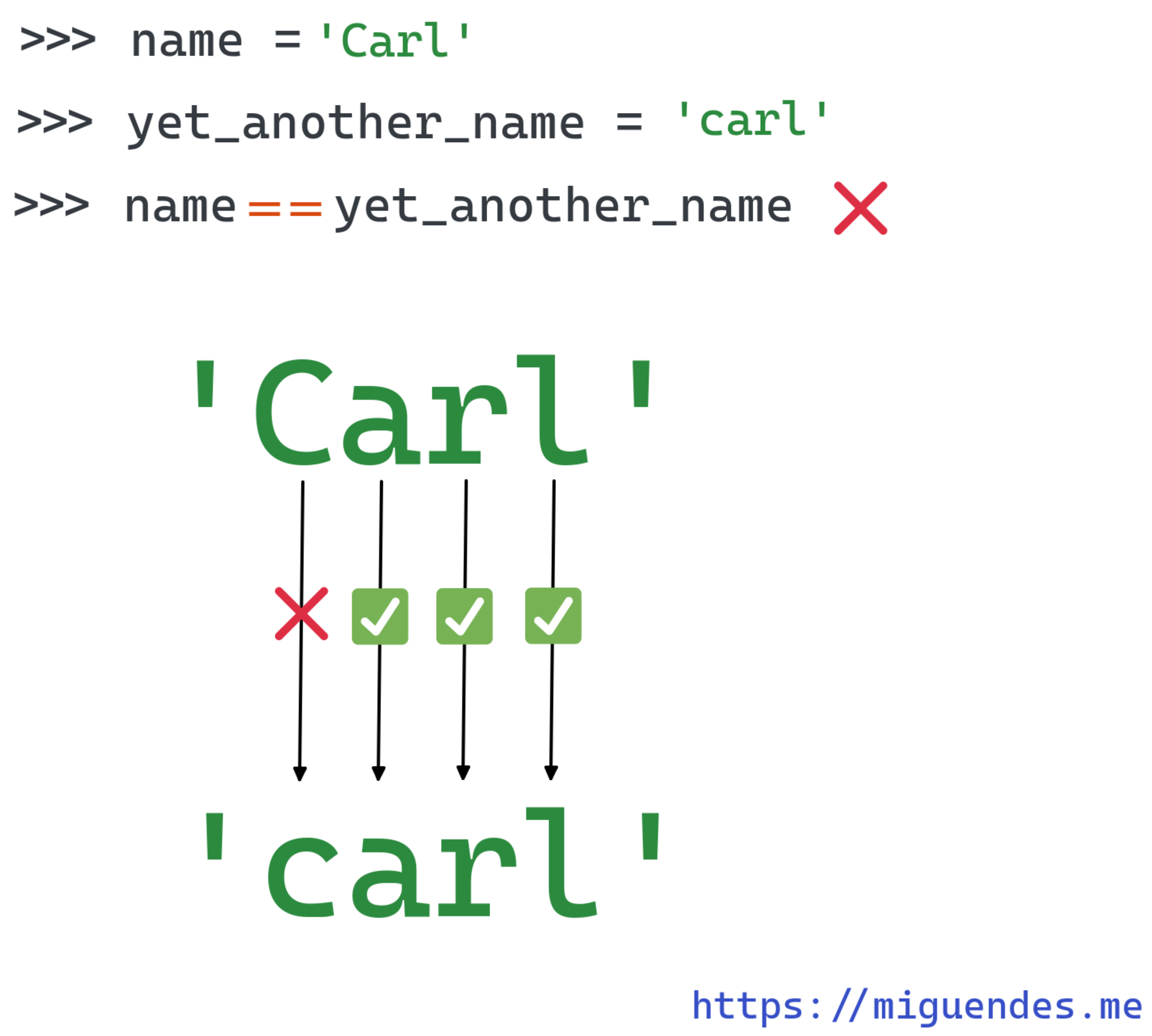
>>> name = 'Carl'

>>> yet_another_name = 'carl'

>>> name == yet_another_name
False

>>> name != yet_another_name
True
Comparing strings using the is operator
Another way of comparing if two strings are equal in Python is using the is operator. However, the kind of comparison it performs is different than ==. The is operator compare if the 2 string are the same instance.
In Python—and in many other languages—we say two objects are the same instance if they are the same object in memory.
>>> name = 'John Jabocs Howard'

>>> another_name = name

>>> name is another_name
True

>>> yet_another_name = 'John Jabocs Howard'

>>> name is yet_another_name
False

>>> id(name)
140142470447472

>>> id(another_name)
140142470447472

>>> id(yet_another_name)
140142459568816
The image below shows how this example would be represented in memory.
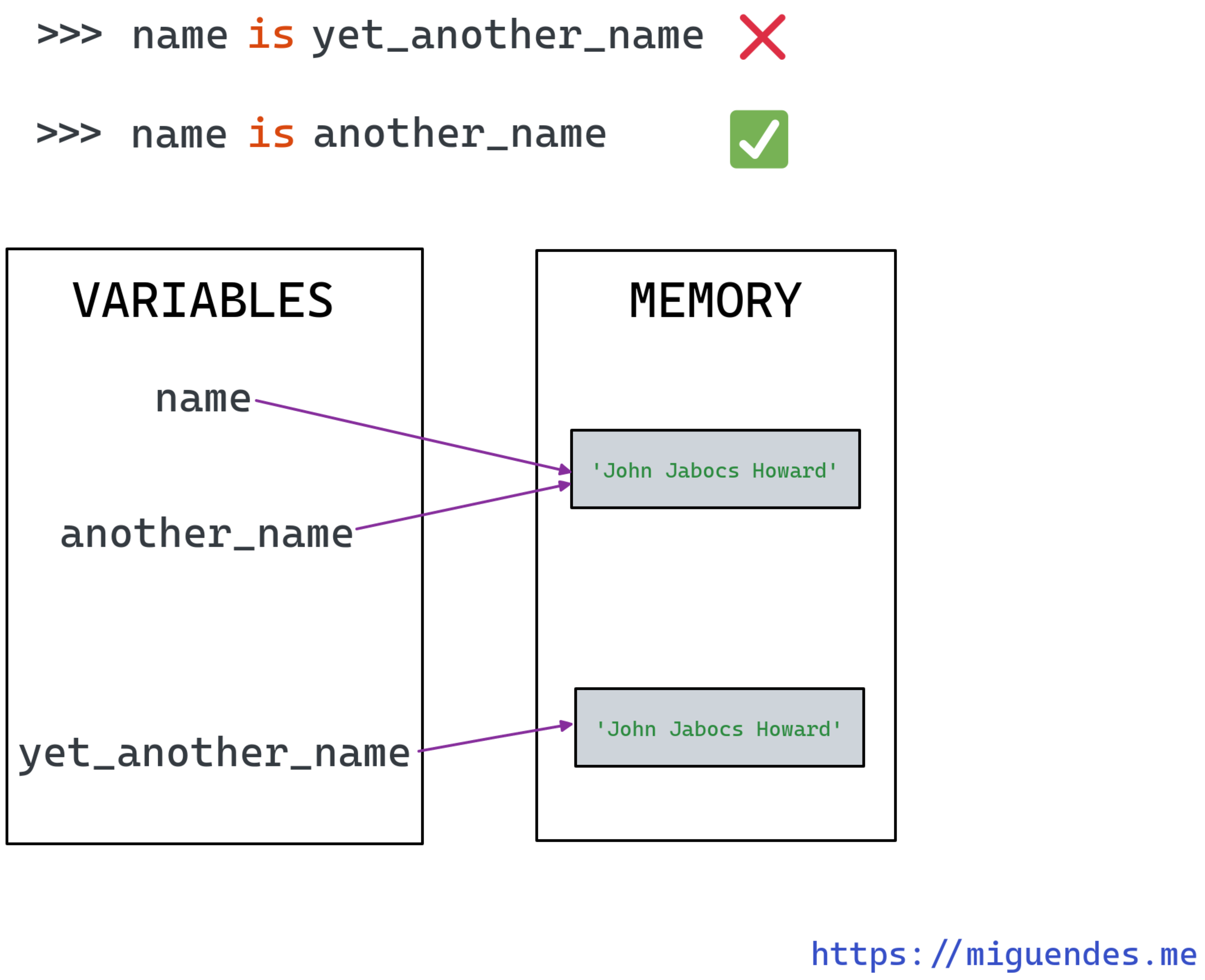
As you see, we're comparing identities, not content. Objects with the same identity usually have the same references, and share the same memory location. Keep that in mind when using the is operator.
Comparing strings using the <, >, <=, and >= operators
The third way of comparing strings is alphabetically. This is useful when we need to determine the lexicographical order of two strings.
Let's see an example.
>>> name = 'maria'

>>> another_name = 'marcus'

>>> name < another_name
False

>>> name > another_name
True

>>> name <= another_name
False

>>> name >= another_name
True
To determine the order, Python compares the strings char by char. In our example, the first three letters are the same mar, but the next one is not, c from marcus comes before i from maria.
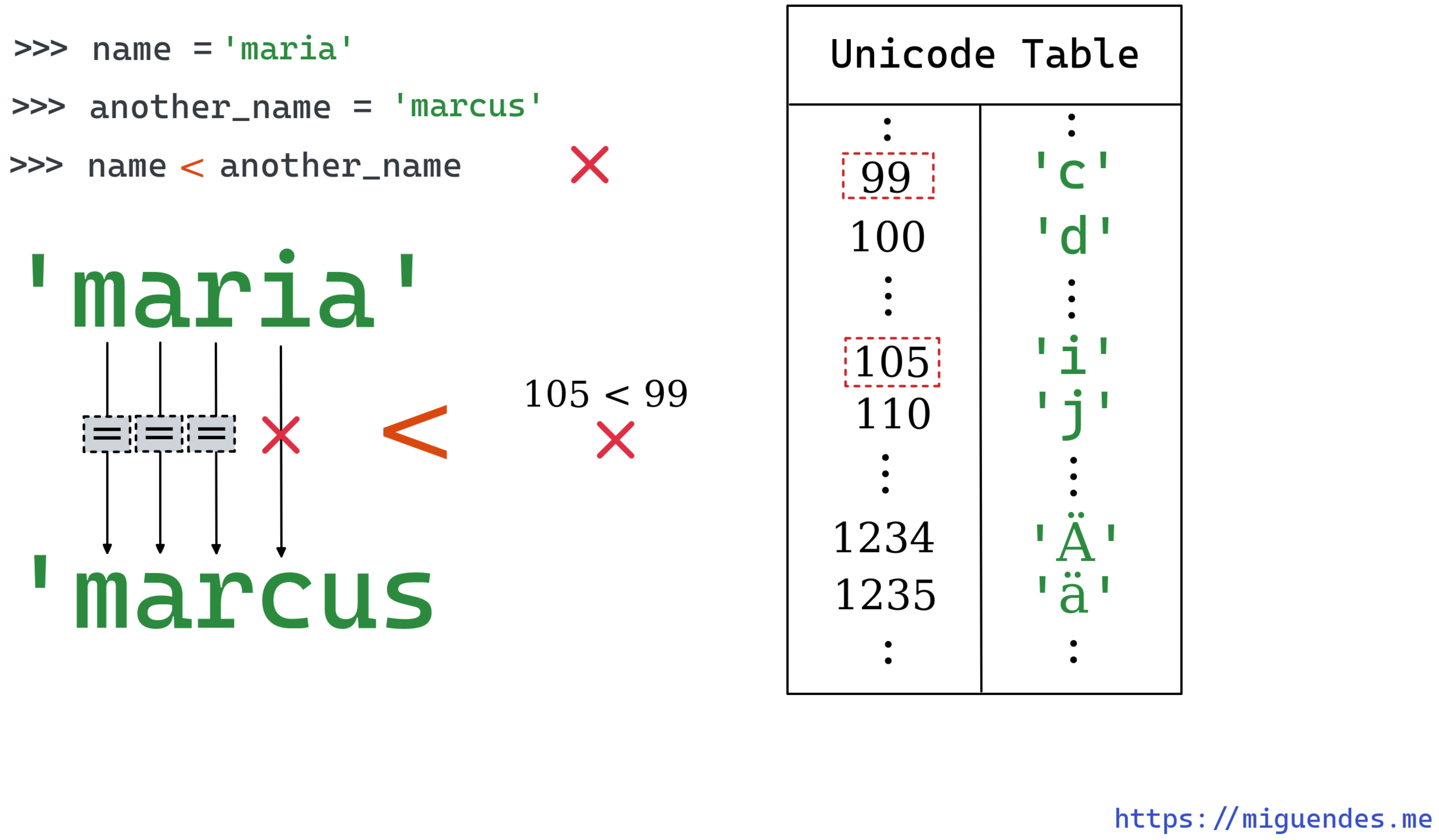
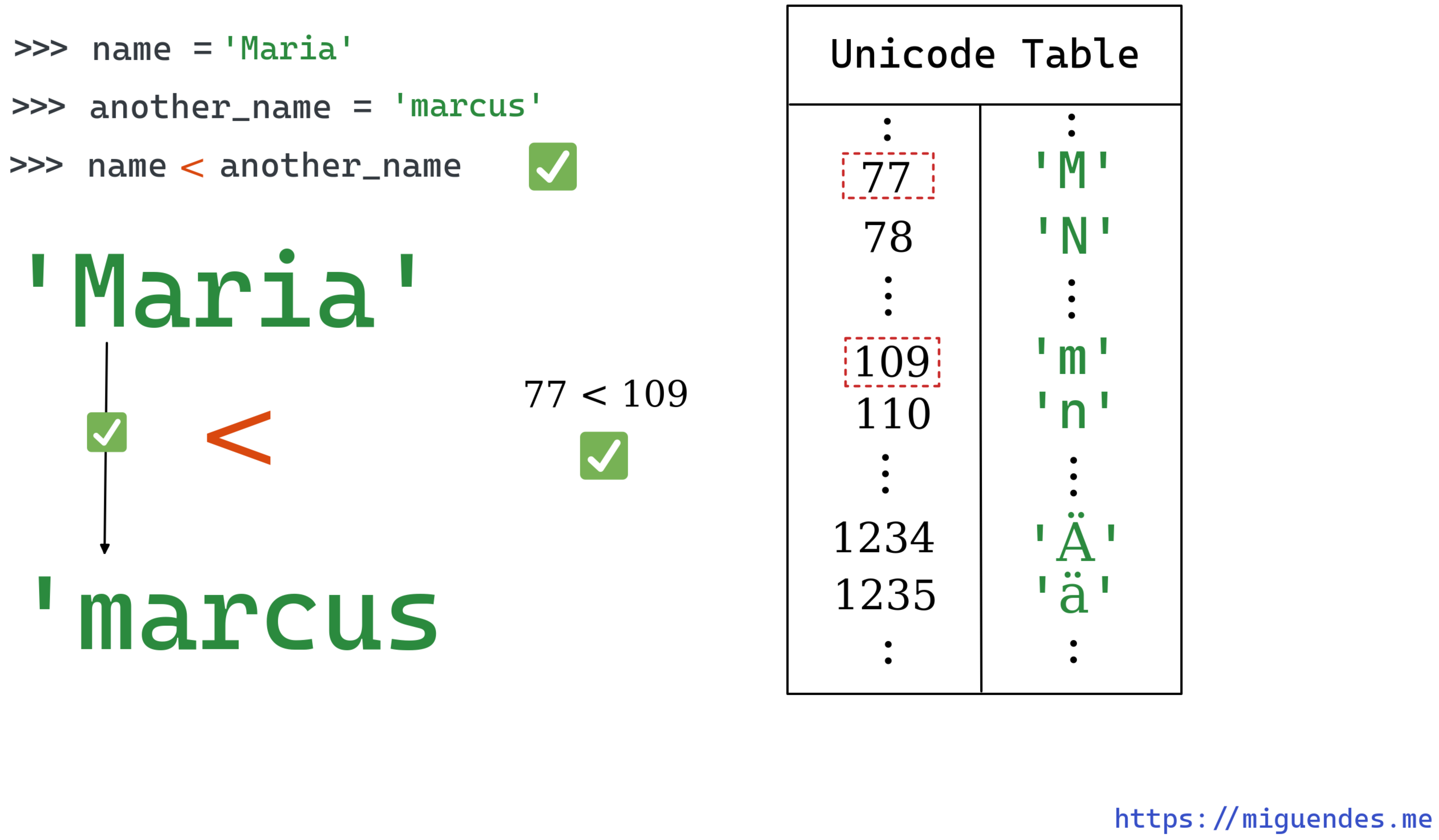
It's important to have in mind that this comparisons are case-sensitive. Python treats upper-case and lower-case differently. For example, if we change "maria" to "Maria", then the result is different because M comes before m.
>>> name = 'Maria'

>>> another_name = 'marcus'

>>> name < another_name
True

>>> ord('M') < ord('m')
True

>>> ord('M')
77

>>> ord('m')
109
⚠️ WARNING ⚠️: Avoid comparing strings that represent numbers using these operators. The comparison is done based on alphabetical ordering, which causes
"2" < "10"to evaluated toFalse.
>>> a = '2'

>>> b = '10'

>>> a < b
False

>>> a <= b
False

>>> a > b
True

>>> a >= b
True
Compare two strings by ignoring the case
Sometimes we may need to compare two strings—a list of strings, or even a dictionary of strings—regardless of the case.
Achieving that will depend on the alphabet we're dealing with. For ASCII strings, we can either convert both strings to lowercase using str.lower(), or uppercase with str.upper() and compare them.
For other alphabets, such as Greek or German, converting to lowercase to make the strings case insensitive doesn't always work. Let's see some examples.
Suppose we have a string in German named 'Straße', which means "Street". You can also write the same word without the ß, in this case, the word becomes Strasse. If we try to lowercase it, or uppercase it, see what happens.
>>> a = 'Atraße'

>>> a = 'Straße'

>>> b = 'strasse'

>>> a.lower() == b.lower()
False

>>> a.lower()
'straße'

>>> b.lower()
'strasse'
That happens because a simple call to str.lower() won't do anything to ß. Its lowercase form is equivalent to ss but ß itself has the same form and shape in lower or upper case.
The best way to ignore case and make effective case insensitive string comparisons is to use str.casefold. According to the docs:
Casefolding is similar to lowercasing but more aggressive because it is intended to remove all case distinctions in a string.
Let's see what happens when we use str.casefold instead.
>>> a = 'Straße'

>>> b = 'strasse'

>>> a.casefold() == b.casefold()
True

>>> a.casefold()
'strasse'

>>> b.casefold()
'strasse'
How to compare two strings and ignore whitespace
Sometimes you might want to compare two strings by ignoring space characters. The best solution for this problem depends on where the spaces are, whether there are multiple spaces in the string and so on.
The first example we'll see consider that the only difference between the strings is that one of them have leading and/or trailing spaces. In this case, we can trim both strings using the str.strip method and use the == operator to compare them.
>>> s1 = 'Hey, I really like this post.'

>>> s2 = '      Hey, I really like this post.   '

>>> s1.strip() == s2.strip()
True
However, sometimes you have a string with whitespaces all over it, including multiple spaces inside it. If that is the case, then str.strip is not enough.
>>> s2 = '      Hey, I really      like this post.   '

>>> s1 = 'Hey, I really like this post.'

>>> s1.strip() == s2.strip()
False
The alternative then is to remove the duplicate whitespaces using a regular expression. This method only returns duplicated chars, so we still need to strip the leading and trailing ones.
>>> s2 = '      Hey, I really      like this post.   '

>>> s1 = 'Hey, I really like this post.'

>>> re.sub('\s+', ' ', s1.strip())
'Hey, I really like this post.'

>>> re.sub('\s+', ' ', s2.strip())
'Hey, I really like this post.'

>>> re.sub('\s+', ' ', s1.strip()) == re.sub('\s+', ' ', s2.strip())
True
Or if you don't care about duplicates and want to remove everything, then just pass the empty string as the second argument to re.sub.
>>> s2 = '      Hey, I really      like this post.   '

>>> s1 = 'Hey, I really like this post.'

>>> re.sub('\s+', '', s1.strip())
'Hey,Ireallylikethispost.'

>>> re.sub('\s+', '', s2.strip())
'Hey,Ireallylikethispost.'

>>> re.sub('\s+', '', s1.strip()) == re.sub('\s+', '', s2.strip())
True
The last and final method is to use a translation table. This solution is an interesting alternative to regex.
>>> table = str.maketrans({' ': None})

>>> table
{32: None}

>>> s1.translate(table)
'Hey,Ireallylikethispost.'

>>> s2.translate(table)
'Hey,Ireallylikethispost.'

>>> s1.translate(table) == s2.translate(table)
True
A nice thing about this method is that it allows removing not only spaces but other chars such as punctuation as well.
>>> import string

>>> table = str.maketrans(dict.fromkeys(string.punctuation + ' '))

>>> s1.translate(table)
'HeyIreallylikethispost'

>>> s2.translate(table)
'HeyIreallylikethispost'

>>> s1.translate(table) == s2.translate(table)
True
How to compare two strings for similarity (fuzzy string matching)
Another popular string comparison use case is checking if two strings are almost equal. In this task, we're interested in knowing how similar they are instead of comparing their equality.
To make it easier to understand, consider a scenario when we have two strings and we are willing to ignore misspelling errors. Unfortunately, that's not possible with the == operator.
We can solve this problem in two different ways:
- using the
difflibfrom the standard library - using an external library such as
jellysifh
Using difflib
The difflib in the standard library has a SequenceMatcher class that provides a ratio() method that returns a measure of the string's similarity as a percentage.
Suppose you have two similar strings, say a = "preview", and b = "previeu". The only difference between them is the final letter. Let's imagine that this difference is small enough for you and you want to ignore it.
By using SequenceMatcher.ratio() we can get the percentage in which they are similar and use that number to assert if the two strings are similar enough.
from difflib import SequenceMatcher

>>> a = "preview"

>>> b = "previeu"

>>> SequenceMatcher(a=a, b=b).ratio()
0.8571428571428571
In this example, SequenceMatcher tells us that the two strings are 85% similar. We can then use this number as a threshold and ignore the difference.
>>> def is_string_similar(s1: str, s2: str, threshold: float = 0.8) -> bool
    ...: :
    ...:     return SequenceMatcher(a=s1, b=s2).ratio() > threshold
    ...:

>>> is_string_similar(s1="preview", s2="previeu")
True

>>> is_string_similar(s1="preview", s2="preview")
True

>>> is_string_similar(s1="preview", s2="previewjajdj")
False
There's one problem, though. The threshold depends on the length of the string. For example, two very small strings, say a = "ab" and b = "ac" will be 50% different.
>>> SequenceMatcher(a="ab", b="ac").ratio()
0.5
So, setting up a decent threshold may be tricky. As an alternative, we can try another algorithm, one that the counts transpositions of letters in a string. And the good new is, such an algorithm exists, and that's what we'll see next.
Using Damerau-Levenshtein distance
The Damerau-Levenshtein algorithm counts the minimum number of operations needed to change one string into another.
In another words, it tells how many insertions, deletions or substitutions of a single character; or transposition of two adjacent characters we need to perform so that the two string become equal.
In Python, we can use the function damerau_levenshtein_distance from the jellysifh library.
Let's see what the Damerau-Levenshtein distance is for the last example from the previous section.
>>> import jellyfish

>>> jellyfish.damerau_levenshtein_distance('ab', 'ac')
1
It's 1! So that means to transform "ac" into "ab" we need 1 change. What about the first example?
>>> s1 = "preview"

>>> s2 = "previeu"

>>>  jellyfish.damerau_levenshtein_distance(s1, s2)
1
It's 1 too! And that makes lots of sense, after all we just need to edit the last letter to make them equal.
This way, we can set the threshold based on number of changes instead of ratio.
>>> def are_strings_similar(s1: str, s2: str, threshold: int = 2) -> bool:
    ...:     return jellyfish.damerau_levenshtein_distance(s1, s2) <= threshold
    ...:

>>> are_strings_similar("ab", "ac")
True

>>> are_strings_similar("ab", "ackiol")
False

>>> are_strings_similar("ab", "cb")
True

>>> are_strings_similar("abcf", "abcd")
True

# this ones are not that similar, but we have a default threshold of 2
>>> are_strings_similar("abcf", "acfg")
True

>>> are_strings_similar("abcf", "acyg")
False
How to compare two strings and return the difference
Sometimes we know in advance that two strings are different and we want to know what makes them different. In other words, we want to obtain their "diff".
In the previous section, we used difflib as a way of telling if two strings were similar enough. This module is actually more powerful than that, and we can use it to compare the strings and show their differences.
The annoying thing is that it requires a list of strings instead of just a single string. Then it returns a generator that you can use to join into a single string and print the difference.
>>> import difflib

>>> d = difflib.Differ()

>>> diff = d.compare(['my string for test'], ['my str for test'])

>>> diff
<generator object Differ.compare at 0x7f27703250b0>

>>> list(diff)
['- my string for test', '?       ---\n', '+ my str for test']

>>> print('\n'.join(diff))
- my string for test
?       ---

+ my str for test
String comparison not working?
In this section, we'll discuss the reasons why your string comparison is not working and how to fix it. The two main reasons based on my experience are:
- using the wrong operator
- having a trailing space or newline
Comparing strings using is instead of ==
This one is very common amongst novice Python developers. It's easy to use the wrong operator, especially when comparing strings.
As we've discussed in this article, only use the is operator if you want to check if the two string are the same instances.
Having a trailing whitespace of newline (\n)
This one is very common when reading a string from the input function. Whenever we use this function to collect information, the user might accidentally add a trailing space.
If you store the result from the input in a variable, you won't easily see the problem.
>>> a = 'hello'

>>> b = input('Enter a word: ')
Enter a word: hello

>>> a == b
False

>>> a
'hello'

>>> b
'hello '

>>> a == b.strip()
True
The solution here is to strip the whitespace from the string the user enters and then compare it. You can do it to whatever input source you don't trust.
Conclusion
In this guide, we saw 8 different ways of comparing strings in Python and two most common mistakes. We saw how we can leverage different operations to perform string comparison and how to use external libraries to do string fuzzy matching.
Key takeaways:
- Use the
==and!=operators to compare two strings for equality - Use the
isoperator to check if two strings are the same instance - Use the
<,>,<=, and>=operators to compare strings alphabetically - Use
str.casefold()to compare two string ignoring the case - Trim strings using native methods or regex to ignore whitespaces when performing string comparison
- Use
diffliborjellyfishto check if two strings are almost equal (fuzzy matching) - Use
difflibto to compare two strings and return the difference - String comparison is not working? Check for trailing or leading spaces, or understand if you are using the right operator for the job
That's it for today, and I hope you learned something new. See you next time!
Other posts you may like:
This post was originally published at https://miguendes.me
About the author
AI Software Engineer based in London, UK with 6+ years of professional experience developing and releasing software in different programming languages - Hobbyist Technical Writer - Interested in Software Testing, Best Practices, Scalability, Machine Learning/AI, and Python.
Comments
Join the discussionPython is the language of the future, and Gyansetu's Python courses are the perfect gateway to this exciting world. Their expert instructors and practical approach make learning Python a breeze. Whether you're a beginner or looking to level up your skills, Gyansetu has you covered! For more info:- https://www.gyansetu.in/blogs/future-scope-of-python-in-india/
This is insightful
Hi, would need your thoughts to find the diff between the two strings. Have gone through the article but somehow I could not fetch the write solutions.
c1 = 'X+v//wwAAAAmNjY0Wm+DhsDZ2TyBnLw9JDFw2YUsthQViGonKRuO/UZETzIzMTYx'
c2 = 'X+v//wwAAAAmNjY0Wm+DhsDZ2TyBnLw9JDFw2YUsthQViGonKRuO/UZETzIzMTYx'
c1 is c2 returns False but c1 == c2 returns True Not sure how to fix this error.
Hi thank you for all!
I'm begin to Python and i'm trying to make a function, with a condition that finds a row of characters following, between two list of words.
I search something like this:
List1 = ['Birmanie', 'Biélorussie', 'Bolivie', 'Brunei', 'Burkina', 'Bélize', 'Cap-Vert']

List2 = ['Belize', 'Bermudes', 'Bolivie (État plurinational de)', 'Brunéi Darussalam', 'Burkina Faso', 'Bélarus', 'Cabo Verde']

def matchingword(number_of_character_following = 3)
    for number_of_characters_in_a_row in list1:
        if number_of_characters_in_a_row in list2:
            return possible_matching_words in []
        else:
            return no_matching_words in []
My result should be:
possible_matching_words = ['Biélorussie':'Bélarus', 'Biélorussie':'Brunéi Darussalam', 'Bolivie':'Bolivie (État plurinational de)', 'Brunei':'Brunéi Darussalam', 'Burkina':'Burkina Faso', 'Cap-Vert':'Cabo Verde']
How can i do please?
Hey Frédéric La Rosa, you can use the difflib for that.
Example:
In [1]: List1 = ['Birmanie', 'Biélorussie', 'Bolivie', 'Brunei', 'Burkina', 'Bélize', 'Cap-Vert']


In [2]: List2 = ['Belize', 'Bermudes', 'Bolivie (État plurinational de)', 'Brunéi Darussalam', 'Burkina Faso', 'Bélarus', 'Cabo Verde']


In [5]: from difflib import SequenceMatcher

In [8]: def find_longest_matching(list1, list2, match_len=3):
   ...:     res = []
   ...:     for s1 in list1:
   ...:         for s2 in list2:
   ...:             match = SequenceMatcher(None, s1, s2).find_longest_match(0, len(s1), 0, len(s2))
   ...:             if match.size >= match_len:
   ...:                 res.append({'s1': s1, 's2': s2, 'match': s1[match.a: match.a + match.size]})
   ...:     return res
   ...:

In [9]: find_longest_matching(List1, List2)
Out[9]:
[{'s1': 'Biélorussie', 's2': 'Brunéi Darussalam', 'match': 'russ'},
 {'s1': 'Biélorussie', 's2': 'Bélarus', 'match': 'rus'},
 {'s1': 'Bolivie',
  's2': 'Bolivie (État plurinational de)',
  'match': 'Bolivie'},
 {'s1': 'Brunei', 's2': 'Brunéi Darussalam', 'match': 'Brun'},
 {'s1': 'Burkina', 's2': 'Bolivie (État plurinational de)', 'match': 'ina'},
 {'s1': 'Burkina', 's2': 'Burkina Faso', 'match': 'Burkina'},
 {'s1': 'Bélize', 's2': 'Belize', 'match': 'lize'},
 {'s1': 'Bélize', 's2': 'Bélarus', 'match': 'Bél'},
 {'s1': 'Cap-Vert', 's2': 'Cabo Verde', 'match': 'Ver'}]
Is that what you want? You tweak this function to return only the exact match length you look for, like 3.
Miguel Brito Great Miguel, thank you! I find with a friend this function, using the levenshtein distance:
ListEtats = ['Birmanie', 'Biélorussie', 'Bolivie', 'Brunei', 'Burkina', 'Bélize', 'Cap-Vert', 'Centrafrique', 'Chine', 'Corée du Nord', 'Corée du Sud', 'Guatémala', 'Guinée Bissao', 'Irak', 'Iran', 'Kirghizstan', 'Kosovo', 'Kénya', 'Laos', 'Liechtenstein', 'Lésotho', 'Micronésie', 'Moldavie', 'Monaco', 'Niue', 'Royaume-Uni', 'Russie', 'Saint-Christophe et Niévès', 'Saint Marin', 'Saint Vincent et les Grenadines', 'Salomon', 'Salvador', 'Syrie', 'Tanzanie', 'Timor oriental', 'Vatican', 'Vietnam', 'Vénézuéla', 'Zimbabwé', 'États Unis']

ListZones = ['Belize', 'Bermudes', 'Bolivie État plurinational de', 'Brunéi Darussalam', 'Burkina Faso', 'Bélarus', 'Cabo Verde', 'Chine RAS de Hong Kong', 'Chine RAS de Macao', 'Chine Taiwan Province de', 'Chine continentale', 'El Salvador', 'Fédération de Russie', 'Groenland', 'Guatemala', 'Guinée Bissau', 'Iran République islamique d', 'Iraq', 'Kenya', 'Kirghizistan', 'Lesotho', 'Micronésie États fédérés de', 'Myanmar', 'Nioué', 'Nouvelle Calédonie', 'Palestine', 'Polynésie française', 'Porto Rico',  'Royaume Uni de Grande-Bretagne et d Irlande du Nord', 'République arabe syrienne', 'République centrafricaine', 'République de Corée', 'République de Moldova', 'République démocratique populaire lao', 'République populaire démocratique de Corée', 'République Unie de Tanzanie', 'Saint Kitts et Nevis', 'Saint Vincent et les Grenadines', 'Samoa américaines', 'Timor Leste', 'Tokélaou', 'Venezuela République bolivarienne du', 'Viet Nam', 'Zimbabwe', 'États Unis d Amérique', 'Îles Salomon']

import jellyfish

def compareList(list1, list2):
    dict = {}
    for item1 in list1:
        for item2 in list2:
            current_leven = jellyfish.jaro_distance(item1, item2)
            if item1 not in dict or current_leven > jellyfish.jaro_distance(item1, dict[item1][0]):
                dict[item1] = (item2, current_leven)
    return dict

compareList(ListEtats, ListZones)
This is good but i think i need to optimise this one by applying your method in a second argument.
Thank you again for your help!